Posts

Showing posts with the label computer fundamentals

Windows Shortcut Keys

Shortcut Keys System!!  CTRL+A. . . . . . . . . . . . . . . . . Select All CTRL+C. . . . . . . . . . . . . . . . . Copy CTRL+X. . . . . . . . . . . . . . . . . Cut CTRL+V. . . . . . . . . . . . . . . . . Paste CTRL+Z. . . . . . . . . . . . . . . . . Undo CTRL+B. . . . . . . . . . . . . . . . . Bold CTRL+U. . . . . . . . . . . . . . . . . Underline CTRL+I . . . . . . . . . . . . . . . . . Italic F1 . . . . . . . . . . . . . . . . . . . . . . Help F2 . . . . . . . . . . . . . . . . . . . . . Rename selected object F3 . . . . . . . . . . . . . . . . . . . . . Find all files F4 . . . . . . . . . . . . . . . . . . . . . Opens file list drop-down in dialogs F5 . . . . . . . . . . . . . . . . . . . . . Refresh current window F6 . . . . . . . . . . . . . . . . . . . . . Shifts focus in Windows Explorer F10 . . . . . . . . . . . . . . . . . . . . Activates menu bar options ALT+TAB . . . . . . . . . . . . . . . . Cycles between open applications ALT+F4 . . . . . . . . . . . . . . . . . Quit ...

Fundamentals Of Computer - Chapter-4 - PC Hardware & Software

Image
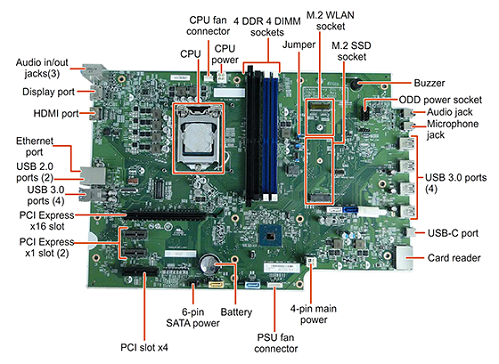
PC Hardware & Software       Computer Hardware comprises physical components that make up the computer system. Software is a collection of instructions that directs computer hardware on whats to be done. Hardware is useless without software to run on it and vice versa. This chapter provides a comprehensive view of technical aspects related to the mechanical and electronic parts of a computer, white introducing you to its functionality logic part.      Almost everyone uses a computer daily, but many don't know how computer works or all the different individual pieces that make it up.As a computer user it is important that you have a basic understanding of the core components that make up your computer. This knowledge will prove invaluable if you decide to upgrade your computer or if a piece of hardware breaks and you need to purchase a replacement. The purpose of this session is to discuss the basic pieces in a personal computer and their function...

Fundamentals of Computer & Operating System 2019 december

Image
KERALA STATE RUTRONIX Fundamentals of Computer & Operating System (CTTC, CTTC CWPDE. PHOTO, POCHA. DCA DCA FT, DOA) Time: 2 hours Maxim marks 100 Note: Write the answers for Questions from 1 to 30 in the MCQ answer sheet Part I Choose the most appropriate answer (10 X 1 Mark = 10 Marks) 1) Dot matrix printer is type of printer a) Non impact b) Impact c) Laser d) Line 2) ............... Is a wireless local area network. a) Bluetooth b) Wifi c) Fire wire d) None of these 3) ................ is a search engine a) NCSA Mosaic b) Google c) Netscape Navigator d) Opera 4) The fastest computer is ............... a) Super computer. b) Laptop computer c) Micro computer d) Mainframe computer 5) Which one of the following is an optical memory a) Bubble b) Cate c) Blue Ray d) Flash 6) .............. is a single user operating system, a) Linux b) Windows XP c) Unix d MS-DOS 7) Which one of the following is not an application...

Fundamentals Of Computer- Chapter-3- INPUT & OUTPUT DEVICES

Image
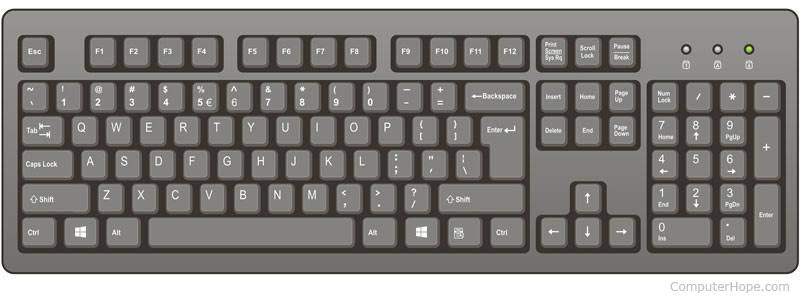
INPUT & OUTPUT DEVICES     Input devices are used to feed data and instruction to the computer. The result produced by the CPU s in the form of electronic binary signals It has to be converted to a form, which can be understood by human beings This function is performed by Output Units. 1. Input Devices These are the various input devices. 1.1 Keyboard         Keyboard is one of the primary means by which we communicate with the computer. There are many different types of computer keyboards: wired, wireless, ergonomic, and multimedia. Although there may be differences in the location of some keys or features, keyboards are very similar and allow you to accomplish basically the same tasks. A typical PC keyboard is shown in the figure below.         The computer keyboard very similar to typewriter keyboard, with the addition of special keys including numeric keypad, navigation and editing keys, direct...